

Read Article
Read Article
Discussion –
4 SQL Payroll Features to Speed Up Your Work
PART 1
01 Bulk update employees salary increments
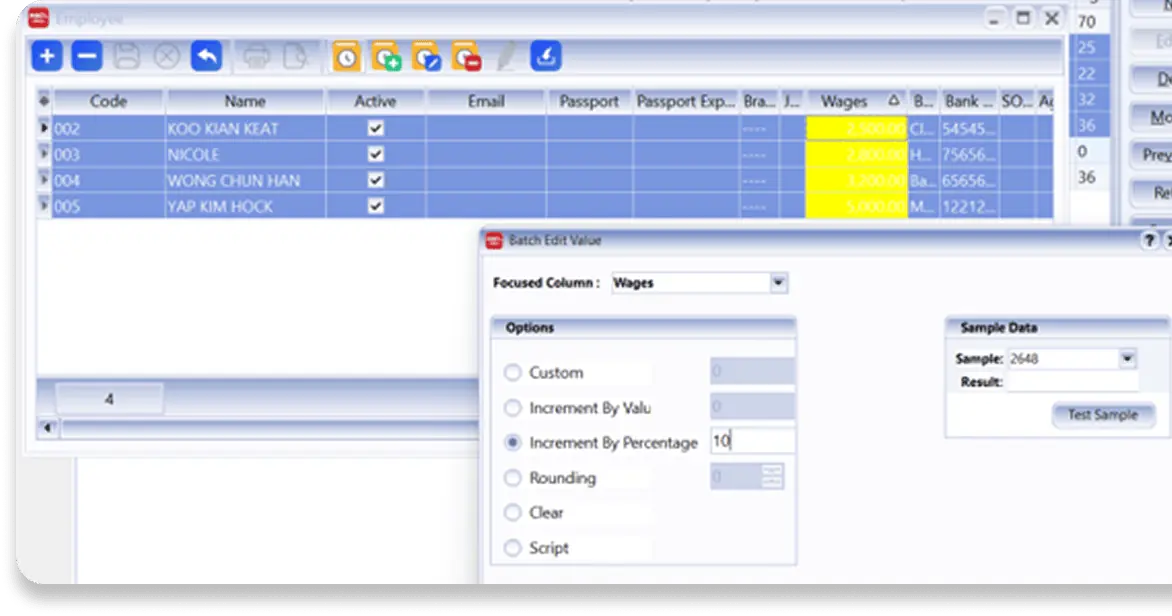
SQL Payroll allows you to update salary increments for multiple employees in a single action, saving time and reducing manual work.
BENEFITS
- Save time during salary revision exercises
- Reduce repetitive manual updates
- Minimise data entry errors
- Process multiple employee records at once
NAVIGATE TO
Go to Human Resources | Maintain Employee. Highlight the employees > click on More > Batch Edit > Right Click > Batch Edit Value
02 Generate Employee HR Letters Instantly
Stop generating employee letters manually. Choose from ready-made templates to create and issue letters directly, including:
AVAILABLE LETTERS
- Acceptance of Resignation letter
- Confirmation Evaluation
- Employment Application
- Interview Assessment Form
- Appointment
- Increment letter
- Termination Letter
BENEFITS
- Reduce payroll preparation time
- Improve overtime calculation accuracy
- Minimise duplicate data entry
- Simplify monthly payroll processing
NAVIGATE TO
Human Resource > Highlight employees > click preview > start choose your HR letter
03 Eliminate manual entry of employee overtime records
Reduce manual entry and minimise errors by importing or integrating overtime data directly into SQL Payroll.
AVAILABLE OPTIONS
- Excel Import
(fair efficient) - SQL HRMS ETMS
(most efficient) - 3rd Party TMS
(fair efficient)
BENEFITS
- Reduce payroll preparation time
- Improve overtime calculation accuracy
- Minimise duplicate data entry
- Simplify monthly payroll processing
04 Automated Allowance, Deduction and Benefits in Kind (BIK) Scheduling
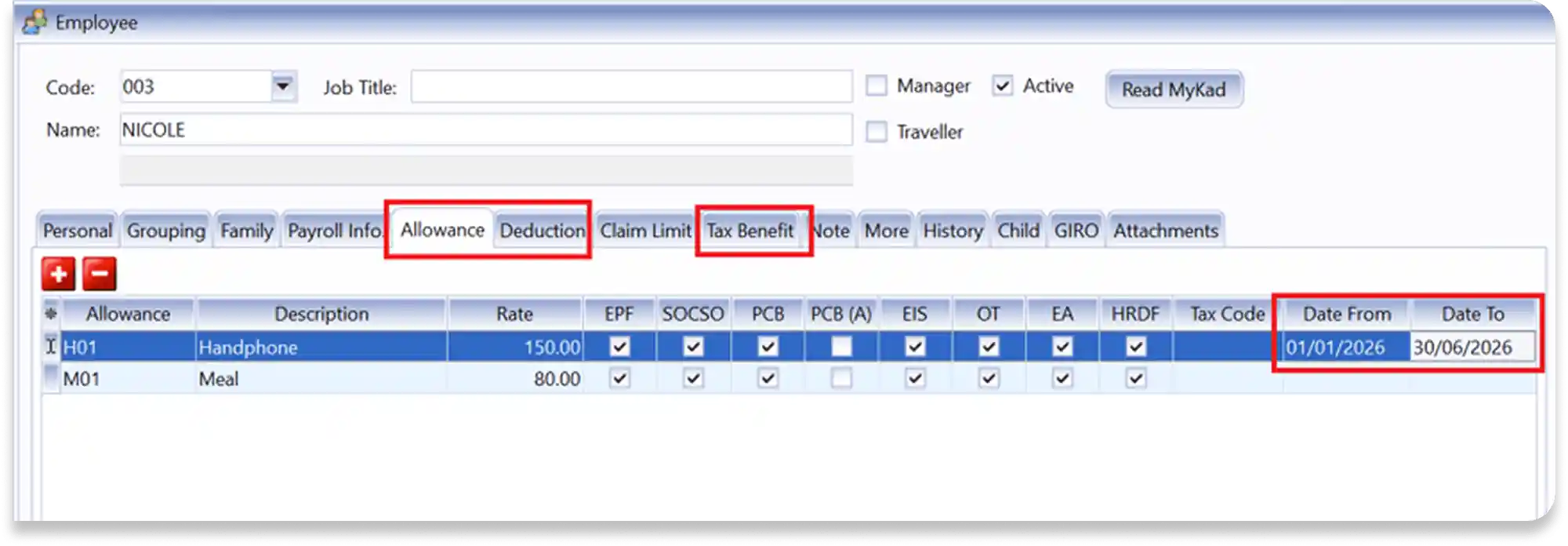
Automatically schedule allowances, deductions, and BIK based on your predefined date ranges to ensure accurate and timely payroll processing.
NAVIGATE TO
Go to Human Resource > Maintain Employee > Edit > Click on Tab to Allowance, Deduction and Tax Benefits > Press + to insert and set the date range.
BEFORE
Manually checking allowances, deductions, and BIK for every payroll run is time-consuming and prone to errors.
AFTER
Simply define the effective date range once, and SQL Payroll will automatically apply the relevant payroll items at the right time.
 Call us now to find out more about SQL Payroll Software.
Just Call or WhatsApp
Kuala Lumpur, Malaysia
M: 012-203 7670
O: 03-2148 7670